Automated Social Media Posting AI: What It Handles and Where You Still Step In
Automated social media posting AI is software that plans, writes, schedules, and publishes content to your social channels, using a language model for the drafting and a set of rules you control for everything else. It is rarely one product you switch on. In practice it is a pipeline: raw material goes in, drafts come out, someone or something approves them, and the scheduler pushes them live. The value shows up in the months when posting stops being a decision anyone has to make.
- Publishing pipelines break on platform API changes far more often than they break on content quality.
- A custom posting system only pays off when post content depends on data the social networks cannot see, such as inventory or appointment availability.
- Most teams approve every post for the first month, then move routine content to automatic publishing and keep review for sensitive topics only.
If you want to see the subscription side first, our comparison of social media automation tools covers the usual options.
What Automated Social Media Posting AI Actually Is
It is a pipeline that turns your source material into formatted posts and publishes them on a schedule, with a language model writing the drafts and your rules deciding what is allowed out.
A scheduler moves a post you already wrote. The AI layer decides what to say in the first place. That gap is the whole reason teams pay for a build rather than another calendar tool.
Ask a simpler question before anything else: what would you post if drafting took no time at all? If the honest answer is "far more than we manage now," automation has room to work. If the answer is "the same three things," a $20 calendar is probably enough.
It also never gets bored. Most accounts do not fail because of bad ideas. They fail on the Thursday in month seven when nobody felt like writing.
How the AI Chooses Topics and Posting Times
It pulls topics from sources you hand it — blog feeds, product data, reviews, or a campaign calendar — and picks posting windows from your own engagement history once there is enough of it.
Raw material beats clever prompts. A feed of your blog posts, a product spreadsheet, a folder of customer questions: any of those gives the model something concrete. "Be creative about our brand" gives it nothing.
Timing leans on your account history. A new profile starts with general benchmarks, then shifts toward its own patterns within a few weeks of steady posting. Old accounts with years of data get useful windows almost immediately.
Deduplication matters more than most people expect. A decent pipeline checks the last month of published posts, so the same tip does not land three different ways in one week.
What the Daily Workflow Looks Like
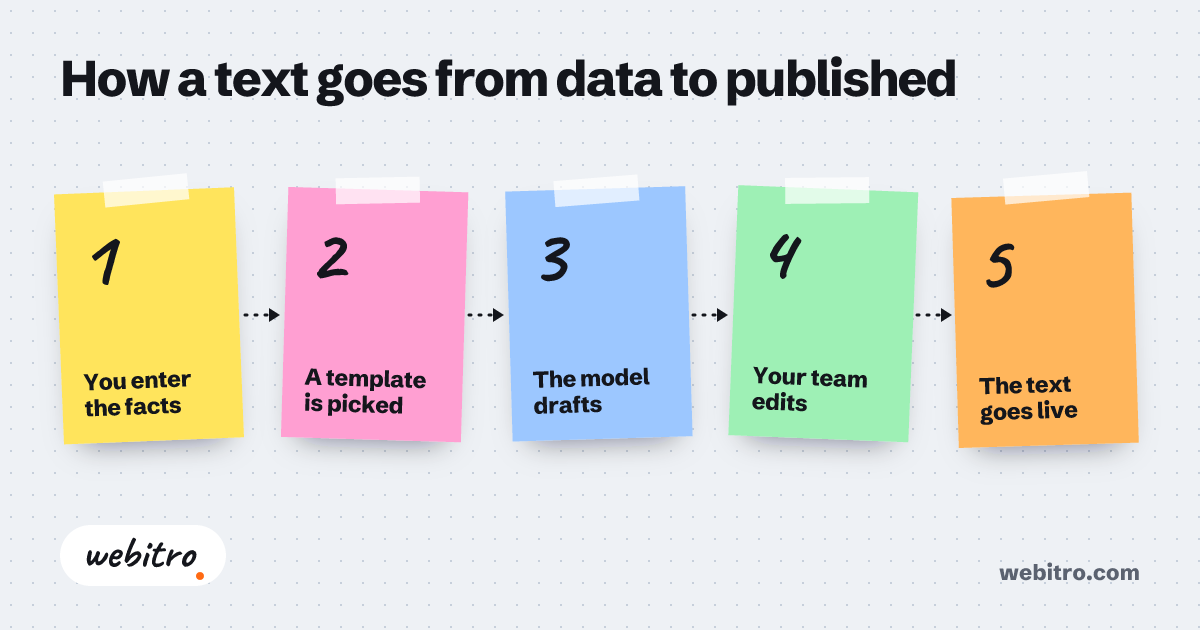
The loop runs from source ingestion to drafts, human review where you want it, scheduled publishing, and a performance read that shapes the next batch.
Content flows in. Drafts come out in your voice, one per channel, trimmed to the length each network allows. Someone approves what needs approving. The scheduler publishes and logs the result.
Most teams approve everything for the first month, then loosen the rules. Routine tips go out automatically. Anything with a price, a promise, or a legal claim waits for a person. That split is a setting, not a rewrite.
Publishing itself leans on each platform's API. This is the fragile part of every setup, because networks change permissions and rate limits on their own schedule and tell nobody.
Scheduler Subscription or Custom Build?
A subscription scheduler covers generic, consistent content, while a custom build pays off when posts depend on your own data, your chat channels, or your approval rules.
Subscription tools give you a calendar, a queue, and basic suggestions. That is enough for a small team posting the same kind of content every week from one dashboard, managed by one person.
Custom work starts when a post depends on something only your systems know. Inventory levels, open appointment slots, new listings, support volume. Generic tools cannot see any of it. That is the point where a custom build of social media automation starts to earn its place.
If you want to see the subscription side first, our comparison of social media automation tools covers the usual options. It is a fair starting point before you commit to building.
When Your Audience Lives in Chat Apps
If your customers spend their day in WhatsApp, Telegram, or Discord, the posting logic behaves like a bot that reads and reacts rather than a calendar that fires on a timetable.
Chat channels change the design. Posts become replies, scheduled drops become triggers, and the system has to read incoming messages before it says anything at all.
If your customers live in chat apps, our notes on the WhatsApp, Telegram, and Discord bot API explain what that build involves. The pipeline differs from a standard scheduler, though the drafting layer underneath is often the same.
Many teams start with an AI content generator and later wrap scheduling, triggers, and approval rules around it. Getting the writing layer right first saves rework when new channels get added.
What Pushes Cost and Timeline Up
The estimate moves with how many channels you connect, how many internal systems the model reads from, and how much review and reporting you want wired into the flow.
Three factors drive most of the number: the platforms you connect, the internal systems feeding the model, and the depth of the approval and reporting layer.
One channel posting from a blog feed is a contained project. A multi-channel system that reads inventory, waits for sign-off, and writes results back into a dashboard is a different scope entirely. No single figure covers both, which is exactly why quotes from different vendors swing so far apart.
We usually start narrow: one channel, one data source, publishing reliably. Then we add the rest. A working first version beats a long plan that has not posted anything yet.
What to Track Once It Is Running
Watch saves, shares, replies, and click-throughs, then compare a clean stretch before automation with a matching stretch after it went live.
Reach tells you the machine is running. It says nothing about whether anyone cared. Saves, shares, and replies are better signals, because each one costs the reader a small amount of effort.
Compare a thirty or sixty day stretch before automation with a matching stretch after. Same channels, same season if you can manage it. That comparison is the only honest read on whether it worked.
Keep a running log of which sources produced posts that performed and which ones did not. After a few cycles, that log tells you where to put more weight in the pipeline.
That is the point where a custom build of social media automation starts to earn its place.
Frequently Asked Questions
Can an AI posting tool publish without any human approval?
It can, and plenty of accounts run that way. Whether yours should comes down to what a bad post costs you. If it is low, let it run. If it touches pricing, legal claims, or a public figure, keep a person on the gate.
Will AI-written posts sound generic?
Not if you feed it your own writing. Hand the model ten of your best past posts and a short list of phrases you never use. Output tightens up within a day or two.
Which platforms can be connected?
Most major networks expose a publishing API, including Instagram, LinkedIn, TikTok, X, and Facebook. Chat apps connect through their bot interfaces instead, which works differently.
How soon does the first post go live?
Usually well before the full build is finished. Most projects push through a single channel first, then expand once approval and reporting settle into place.