Multi Agent Orchestration: How AI Agent Teams Get Work Done
Multi agent orchestration is the practice of running several specialized AI agents on one workflow, with a controller that plans the steps, routes each job to the right agent, and merges the results. It is different from asking one model one big question. The controller — often called the orchestrator — owns the plan, the shared state, and the decision about what happens when an agent returns something wrong.
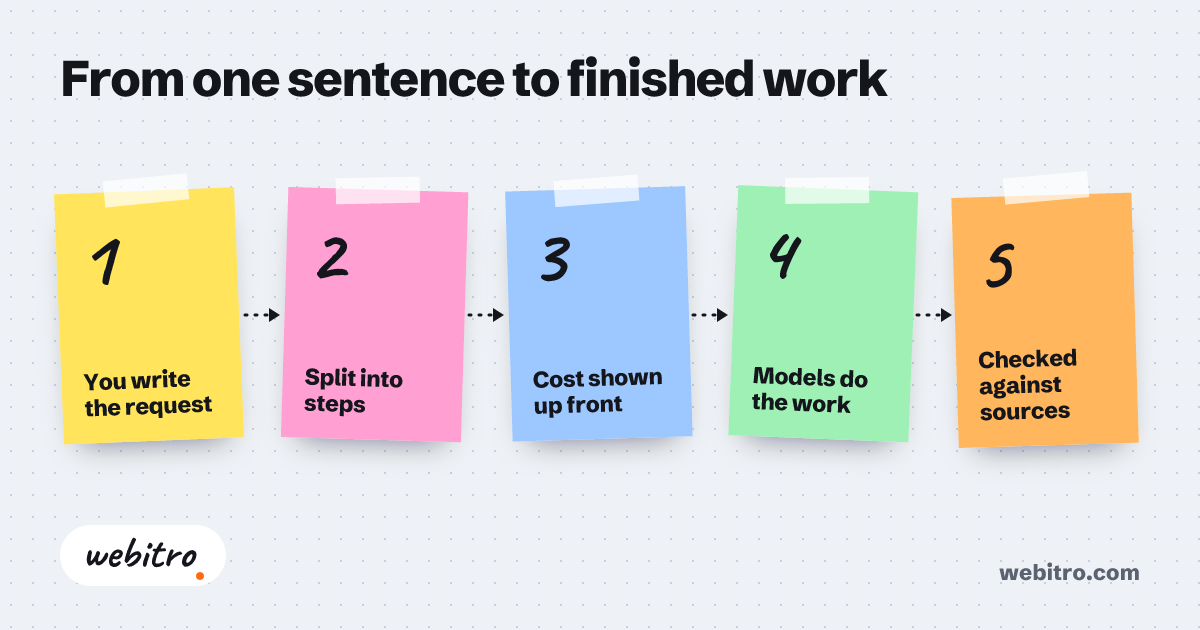
- Multi agent orchestration only pays off when a workflow contains distinct roles or an output that needs independent verification.
- Structured payloads between agents prevent more failures than longer prompts do.
- A scored evaluation set built from real examples should exist before a second agent joins the workflow.
If you want the wider picture first, our breakdown of what AI orchestration means covers the layer sitting above individual models.
What Is Multi Agent Orchestration?
Multi agent orchestration is the control layer that decides which AI agent handles each step, what context it receives, and where its output goes next.
Multi agent orchestration is the control layer above your models. It decides which agent picks up a task, what context travels with it, and what happens when the result comes back wrong.
A single prompt to a single model is not orchestration. Orchestration starts when separate agents — a researcher, a writer, a checker — have to share state and finish one job together.
In practice you get a planner that breaks the request into steps, a router that sends each step to the right agent, and a shared memory store the agents read and write. Without that layer, agents duplicate work or quietly contradict each other.
How Does the Orchestrator Keep Agents From Tripping Over Each Other?
The orchestrator prevents collisions by giving every agent a narrow role, a defined input and output format, and one source of truth for shared state.
Agents fail in groups when they all read the same request and all try to answer it. Good orchestration removes that ambiguity before the first model call happens.
We assign each agent a narrow job: one retrieves documents, one drafts, one verifies numbers against source data. The orchestrator passes structured payloads between them instead of loose chat text.
Shared memory holds the running state — the customer record, prior steps, open questions. Agents read from it and write back results, so nobody has to guess what happened several steps earlier.
Retries and checkpoints matter too. When a verifier rejects a draft, the orchestrator routes it back to the writer with the exact failure attached, not a vague instruction to try again.
Multi Agent vs Single Agent: Which Do You Actually Need?
One agent is usually enough when a task is short and easy to verify, while multi agent orchestration earns its overhead when a workflow has distinct skills, long context, or expensive mistakes.
We usually start clients with a single agent and a well-built prompt. If that answers the business need, orchestration would only add latency and moving parts.
Coordinated agents start making sense when the work splits into roles that need different tools or different data. A contract reviewer and a lead qualifier share almost nothing.
Cost of error matters as much as complexity. When a wrong output reaches a customer or a ledger, a separate verification agent is cheaper than the cleanup afterward.
Long workflows also favor orchestration. Once a task runs deep enough, a single context window stops covering it and the state has to live outside the model.
Patterns We Reach For Most Often
Most production systems we build lean on a handful of patterns: supervisor, sequential pipeline, debate-and-verify, or a shared blackboard that agents contribute to.
Supervisor. One lead agent plans and delegates, then assembles the final answer. It is the easiest pattern to trace, because every routing decision happens in one place.
Sequential pipeline. Each agent finishes before the next one starts — scrape, clean, summarize, publish. Predictable, but slower, and a weak early step poisons everything downstream.
Debate and verify. Opposing agents attack the same question from different angles while a judge decides which answer holds up. We use this wherever a wrong figure is costly.
Blackboard. Agents post findings to shared state and pick up whatever is relevant to their role. Flexible for research work, harder to trace when something breaks.
What Actually Drives the Cost and Timeline?
Cost and timeline follow the number of distinct agent roles, how messy the input data is, and how strictly outputs must be verified — not the number of model calls.
Clients often expect a price per agent. That is not how the work breaks down. The real effort sits in integration, evaluation, and the guardrails around each handoff.
Clean, structured input moves fast. When agents have to read scanned PDFs, messy inboxes, or inconsistent spreadsheets, most of the work goes into parsing and validation before any agent runs.
Verification depth changes everything. A draft a human reviews can be rough. A figure that feeds a report or a trading signal needs a checking agent and a tested rule set.
Timeline also depends on how many systems you want connected. Orchestration touching your CRM, warehouse, and messaging tools takes longer than a self-contained workflow.
Where Orchestrated Agents Earn Their Keep
Coordinated agents pay off in lead generation, content operations, contract review, ecommerce support, and market research, where one workflow contains several genuinely different jobs.
Lead generation is the clearest case. One agent enriches a company record, another scores fit, a third writes the outreach, and a human approves the queue before anything sends.
Content operations work the same way. Research, outline, draft, fact-check, and publish become separate roles, which keeps a weak claim from reaching your blog.
Contract review splits naturally: clause extraction, risk flagging, and comparison against your playbook are separate jobs with separate failure modes.
Ecommerce teams use orchestration for catalog cleanup, review summaries, and support triage. On trading research, a verifying agent that checks figures against source data is standard practice.
Why Orchestration Projects Stall — and What We Do Differently
Most orchestration projects stall because teams skip state design and evaluation, so we ship a measured baseline first and add agents only when the data justifies it.
We keep seeing the same failure modes: overlapping agent roles, no written definition of done, and no way to replay a run that went wrong.
Our fix is boring and it works. We define the output schema first, log every handoff, and build a scoring set from real examples before a second agent exists.
Then we add roles one at a time and measure. If a new agent does not improve the score on that set, it does not ship.
Human checkpoints stay in the loop where the stakes justify them — approving outbound messages, releasing payments, or signing off on flagged contract clauses.
When the workflow is ready for a build, our AI orchestration service covers planning, integration, and the evaluation harness.
Frequently Asked Questions
Is multi agent orchestration the same thing as AI orchestration?
Close, but not identical. AI orchestration is the umbrella term; multi agent orchestration is the version where several specialized agents, not one, handle the steps.
Do we need it if we only use one AI model?
Often no. If one model with a solid prompt handles the job and the output is easy to check, skip the overhead. Bring in agents when the roles genuinely differ.
How do agents pass information to each other?
Through structured payloads and a shared state store, not free-form chat. The orchestrator saves the step result, tags it, and hands the next agent only what it needs.
Can it connect to the tools we already run?
Yes, usually through APIs or direct database access. The orchestrator sits on top of your CRM, help desk, or warehouse rather than replacing any of them.
How do we know the agents are actually working?
You measure it. We hold a fixed set of real examples and score every version against it, so a regression shows up before your customers see it.