AI Agents Explained: How They Work and When Your Business Needs One
An AI agent is software that takes a goal, decides which steps to take, uses tools and data to carry them out, and keeps working until the job is done or a person takes over. The label gets stretched a lot, so this piece separates agents from chatbots and old-school automation, shows where they earn their keep, and explains what actually drives the cost of building one.
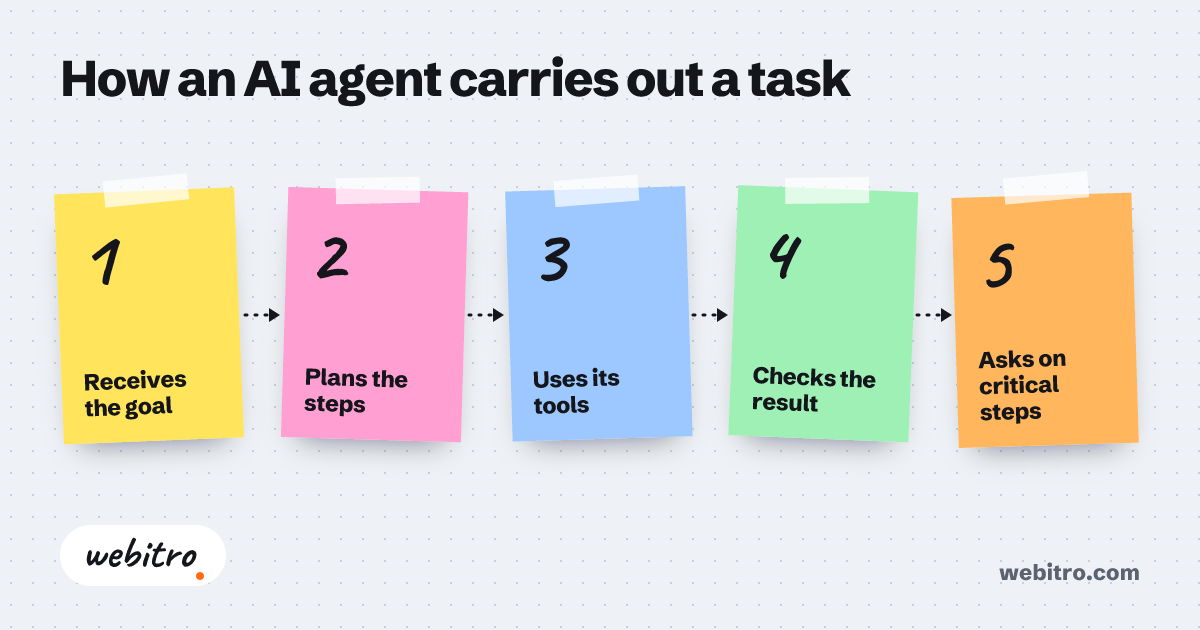
- An AI agent decides its own next step, while a chatbot only replies and a script only follows the path you mapped in advance.
- Agents need tool access and a feedback loop; remove either one and the system is automation with a trendier label.
- The cost of an agent build tracks the number of systems it connects and the amount of human review the workflow requires.
If you would rather nail the vocabulary before the architecture, our explainer on what are AI agents covers the terms in more depth.
What Is an AI Agent?
An AI agent is software that takes a goal in plain language, decides its own steps, uses tools and outside data to act, then checks the result and adjusts before it finishes.
Most software waits for a click. An agent gets a goal — "qualify these inbound leads" or "sort this pile of vendor contracts" — and works out the steps on its own. It can open a document, call an API, post to your CRM, send a message, then look at what came back.
That feedback loop is what people mean when they say an agent acts by itself. Remove the loop and you are left with a script wearing a fancier name.
Agents sit on top of a language model, but the model is only one part of the build. Tool access, memory of earlier steps, and a way to verify its own output matter just as much. If you would rather nail the vocabulary before the architecture, our explainer on what are AI agents covers the terms in more depth.
AI Agent vs. Chatbot vs. Automation
A chatbot replies, an automation follows rules you wrote in advance, and an agent picks its own next step — that choice is the whole difference.
Chatbots answer questions. They match intent to a response and stop there. Automation tools move data along a path you mapped by hand: a form gets submitted, a record appears, an email goes out, done. Both are useful. Neither one decides anything on its own.
An agent takes the same input and asks what should happen next. Maybe it searches your knowledge base. Maybe it asks a colleague. If a step fails, it tries another route instead of leaving an error in a log for someone to find on Monday morning.
That flexibility costs you something. Agents need guardrails, logging, and a human who can review strange decisions. Plain automation is cheaper to run and easier to predict, which is why plenty of jobs should stay plain automation. Our breakdown of how AI automation and RPA differ gets into that comparison in more depth.
The Agent Loop: Plan, Act, Check, Repeat
Every agent runs some version of one loop — read the goal, plan a step, use a tool, inspect the result, then correct and continue until the goal is met.
Start with the goal. The agent breaks it into steps it believes will get there, then takes the first one. A tool is anything outside the model: a database query, a web search, an email send, a spreadsheet read, another agent.
After each action it looks at the result. Did the query return rows? Did the email bounce? Was the contract clause actually in that file? That observation shapes the next move. When something looks wrong, a decent agent retries, changes approach, or hands the task to a person.
Most of our custom AI agent development work follows that pattern: narrow scope, tight logging, and one human kept in the loop.
Where AI Agents Pay Off in Real Work
Agents pay off on repeatable work that mixes messy input, small judgment calls, and handoffs between systems you already own.
Strong first candidates share three traits: the work happens often, the input arrives messy, and somebody currently copies data between tools. Inbound lead qualification fits that shape. So does contract triage, pulling prices off supplier sites, or a first draft of routine reports.
Inbound qualification is a common first project, and our AI lead generation builds put scoring and routing inside the same loop.
Poor candidates are jobs that happen twice a year, decisions with real legal exposure, or anything where a wrong answer is expensive and hard to notice. Agents fail quietly. Quiet failures are the ones that hurt.
Market research is another frequent ask: systems that gather filings, prices, and news, then explain what moved. Same loop, different tools.
Off-the-Shelf Tool or Custom Agent?
If a mainstream tool already matches your workflow, buy it; build custom when the agent has to touch your own systems, data, and rules.
Off-the-shelf products win when your process looks like everyone else's. Shared inbox triage, meeting notes, plain content drafts — plenty of subscriptions handle those well, and a custom build would be money spent on a solved problem.
Custom agents make sense when the value sits in the connection: your CRM, your pricing logic, your approval chain, that spreadsheet only two people understand. Agents that live between systems are usually custom, because nobody sells your specific bridge.
When people ask what changes the bill, our guide to custom software cost covers the factors in order. The short version: integration count, data cleanup, and how much human review you want built in.
What Drives the Cost of an Agent Build
Cost tracks how many systems the agent touches, how clean your data is, how much judgment is involved, and how much human review you want in the loop.
An agent that reads one inbox and writes to one sheet is a small project. An agent that reaches into a legacy ERP, checks pricing rules, and files approvals across three teams is not. Integration count is the biggest lever, and it is the one clients underestimate most.
Data quality comes next. If your product names show up in four spellings, someone has to fix that before the agent can be trusted with them. Guardrails, logging, and review screens add work too, though they are what keeps a bad afternoon from becoming a bad quarter.
Nobody can quote a real number without seeing the workflow. Be skeptical of anyone who does it from a short description over email.
Multi-Agent Setups, Explained Simply
A multi-agent setup splits one big job across several narrow agents, then adds a router that decides who handles what.
One agent trying to do everything gets confused fast. A cleaner design gives each agent a small job: one reads documents, one queries the database, one writes the customer reply, one checks the others' work.
A router, sometimes called an orchestrator, sits in front and sends each task to the right specialist. It also handles retries, keeps shared state, and decides when the job is finished.
This design is more capable and more fragile. More moving parts mean more places to fail, so logging matters even more here than it does with a single agent. Keeping those handoffs straight is the hard part, and our AI orchestration service exists for exactly that job.
How to Start Without Betting the Business
Pick one narrow workflow, run the agent beside a human for a few weeks, measure the outcome, and only then widen its access.
Choose a task you can describe in three sentences and measure with one number: minutes per task, error rate, or hours saved each week. Run the agent in shadow mode first. It makes its call, a person still acts, and you compare notes afterward.
Give it the least access it needs. Log every tool call. Keep a human approval on anything customer-facing or irreversible until you have watched a few hundred runs.
When the numbers hold, add the next workflow. Handled that way, the whole project stays boring, which is exactly what you want from software that acts on its own.
Most of our custom AI agent development work follows that pattern: narrow scope, tight logging, and one human kept in the loop.
Frequently Asked Questions
Are AI agents the same thing as ChatGPT?
No. ChatGPT is a model you chat with. An agent wraps a model in tools, memory, and a loop so it can act on your systems and check its own work before it stops.
Do I need a custom agent, or will an off-the-shelf tool do?
If your process matches a common template, buy the tool and move on. Go custom when the agent has to connect your own systems or follow rules that only your business uses.
How long does an agent build take?
It depends on scope. A pilot touching one or two systems moves quickly. Rollouts across legacy tools take much longer, and integration is usually the slow part, not the model work.
What goes wrong once an agent is live?
They fail quietly. An agent will hand back a confident answer built on stale data, or loop on a step that never succeeds. Solid logging and a human review step catch that early.
Is my data safe with an agent?
Only as safe as the access you grant it. Scope permissions tightly, keep credentials out of prompts, and log every tool call so you can see what was read and written.