Claude Code Skills: Reusable Playbooks for Your Codebase
Claude Code skills are folders of instructions, scripts, and reference files that Claude Code loads when your request matches their description, so the assistant follows your team's way of working instead of improvising. Each folder holds a SKILL.md file that names the skill and spells out the steps, plus whatever supporting material the job needs.
- A Claude Code skill is a folder with a SKILL.md file whose name and description determine when Claude loads it.
- Progressive disclosure keeps only the skill's name and description in context until a request matches the trigger.
- Project skills stored in a .claude directory travel with the repository, so cloning the repo installs them for the whole team.
- Because a skill can direct script execution, it should pass the same review as a code dependency.
Video summary of this article
Watch this video on its own page
Video transcript
Claude Code skills are reusable folders that tell Claude how your team works.
Claude Code skills are folders of instructions, scripts, and reference files. Claude loads a skill when your request matches its description. Each folder holds a SKILL.md file that names the skill and spells out the steps.
The frontmatter carries a name and description. Claude compares your request against that description before loading anything else. A vague description can leave a skill unused for months.
Progressive disclosure keeps only the name and description of a skill in context. When a request matches, Claude loads the full instructions and bundled files. This staged loading keeps a large skill library usable.
Skills hold reusable procedure and reference material. Slash commands give you a manual trigger. Subagents run work in an isolated context, while servers connect Claude to outside systems.
Project skills sit inside the repository, so anyone who clones it inherits them. Personal skills live in your home directory across projects. Commit project skills alongside the code they describe.
The full details are in the article.
Skills and subagents are the building blocks, and multi-agent orchestration is where they get combined into a pipeline that hands work between specialists.
What are Claude Code skills?
A Claude Code skill is a folder containing a SKILL.md file plus any supporting scripts or templates, and Claude Code opens that folder whenever your request matches the skill's description.
A skill behaves like a written procedure your strongest engineer would hand to a new hire. It lives in a folder. Inside sits a SKILL.md file with a short header, and usually a few helper files: a script, a template, a style reference, or a checklist your team already trusts.
You drop that folder into a skills directory and Claude Code picks it up the next time you start a session. There is no plugin build step and no compile. Markdown plus a folder is enough to get moving.
The payoff shows up in repetition. The fiftieth database migration Claude writes looks like the one your team approved, because the rules for naming, rollback, and review are written down rather than remembered.
How the SKILL.md header decides when a skill fires
The frontmatter at the top of SKILL.md carries a name and a description, and that description is what Claude compares your request against before loading anything else.
That header is the signpost Claude reads first, so it decides whether a skill triggers at all. A vague description produces a skill that sits unused for months.
Describe the job the way a colleague would. Something like use when adding a new webhook handler or debugging failed deliveries beats a label such as payments helper, because it names situations instead of a topic.
Under the header, write plain instructions: ordered steps, constraints, one or two examples of output you consider correct, and pointers to the other files in the folder.
Progressive disclosure keeps a skill library from flooding the context
Claude reads only a skill's name and description until a request matches, then loads the full instructions and finally the bundled files those instructions point at.
Every skill in a repository cannot sit in the prompt at once. The staged loading order is what keeps a large library usable. A skill can carry a long style guide or a complete database schema, and that cost is paid only when someone needs it.
Preloading everything would bury the actual task under reference material nobody asked for. Splitting a heavy skill into a short body and a separate reference file gives you the same knowledge with a smaller footprint.
Skills vs. slash commands, subagents, and MCP servers
Skills hold reusable procedure, slash commands give you a manual trigger, subagents run work in an isolated context, and MCP servers connect Claude to outside systems.
These four mechanisms solve different problems, and mixing them up wastes effort.
- Skills carry procedure and reference material that should apply automatically.
- Slash commands are manual triggers you invoke by name for a specific run.
- Subagents handle a task in a separate context and report back, leaving your main conversation clean.
- MCP servers link Claude to a database, ticketing tool, or chat platform.
Most teams end up using all four together: a skill describes the release process, a slash command starts it, a subagent checks the changelog, and an MCP server tags the repository.
Skills and subagents are the building blocks, and multi-agent orchestration is where they get combined into a pipeline that hands work between specialists.
Where to store skills: personal, project, and shared packs
Personal skills live in your home directory and follow you across projects, while project skills sit inside the repository so anyone who clones it inherits them.
Placement decides who gets the skill. Project-level storage under a .claude directory suits anything that encodes how this particular codebase works. Personal folders are for scratch experiments you do not want to share yet.
Skill sets distributed as plugins fit organizations that need versioned releases and a changelog. They also give you a place to pin versions when a workflow is audited.
Commit project skills alongside the code they describe. When deployment steps change, the skill changes in the same pull request, and review catches the drift before it spreads.
How to write a skill that survives real work
Short, single-purpose skills with imperative instructions and one worked example outperform long documents that try to cover every case.
Aim for one job, one trigger, and one clear definition of done. If a skill needs three decision trees, it is three skills wearing a trench coat.
Write instructions as commands, not descriptions. Tell Claude what to check, what to refuse, and what to output. Include a real finished result: a migration file, a ticket summary, a formatted changelog entry.
Then test it like code. Run the skill against a case that failed last time, tighten the wording, and record what broke. Skills that never get tested rot quietly into confident bad advice.
Skills outside engineering: support, content, and community bots
The same folder format carries support escalation rules, brand tone, and booking policies, which makes it useful well beyond the editor.
Support teams encode escalation paths. Marketing teams encode tone and formatting. Operations teams encode the steps for onboarding a new client.
We lean on this pattern in the bots we build. A WhatsApp assistant that takes bookings has to know the booking policy, the fallback script, and the moment to hand a conversation to a human. Those rules belong in a skill, not scattered across prompts.
The same folder format feeds the autonomous AI agents we wire into client systems, which is why a well-written skill pays off far beyond one developer's session.
Our AI automation services cover the plumbing around those skills, from triggers to logging, so a rule written once keeps working in production.
If you would rather not maintain this yourself, we build custom Claude Code skills that match how your team already ships software.
Treat skills as executable content, not documentation
A skill can direct Claude to run scripts and touch repositories, so it deserves the same review you give a code dependency.
Read third-party skills before adding them. Check what files they reference and what commands they suggest. A skill that quietly rewrites configuration is a supply chain problem, not a convenience.
Keep secrets out of SKILL.md and point at environment variables instead. Log changes to any skill that touches production systems, and let the same reviewers approve it as the code it operates on.
What a custom skill build involves
Cost follows scope rather than file count, so one workflow is a short engagement while a library spanning deployment, review, and support is a full project.
Two factors move the number most: how much of the process is written down anywhere today, and how many systems the skill must touch. Undocumented tribal knowledge takes interviews to extract. Every connected tool adds a round of testing.
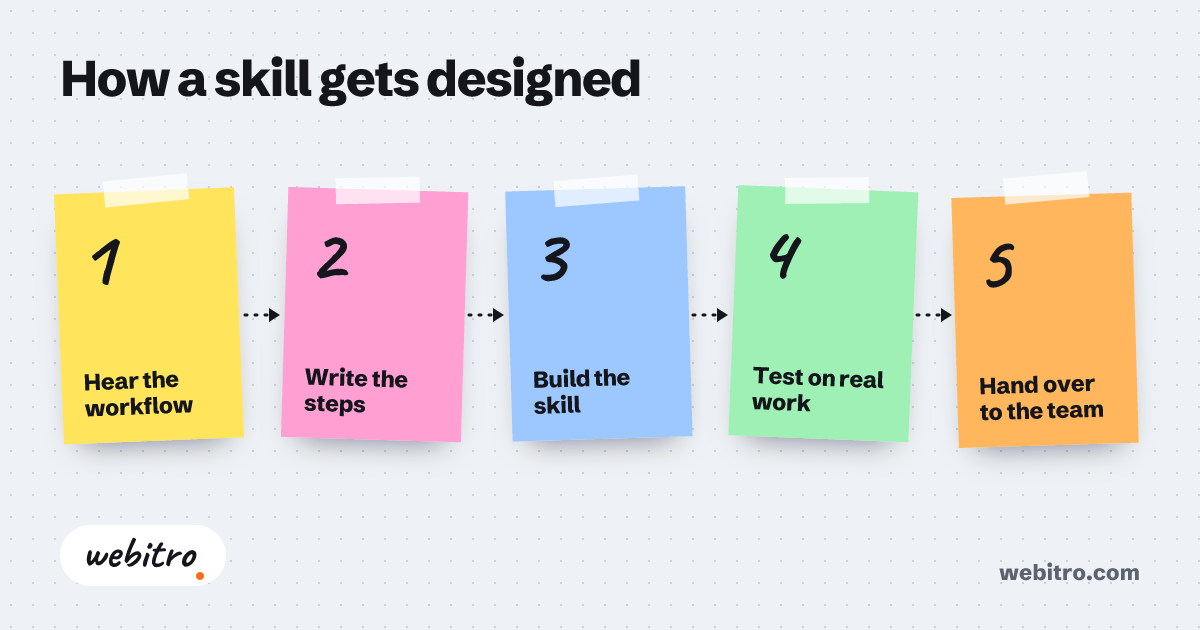
A sensible build runs in stages. First you pick the workflow your team repeats most often and measure how often it currently goes wrong. Then we write the skill, test it against real cases, and hand over the folder with notes on why each rule exists.
Budget questions usually come back to scope, and this breakdown of what custom software costs explains why one skill is a small job while a connected workflow is not.
If you would rather not maintain this yourself, we build custom Claude Code skills that match how your team already ships software.
Frequently Asked Questions
Do Claude Code skills require programming knowledge?
No. The file is plain markdown with a short header. A script in the folder helps, but the instructions themselves are written in ordinary language by whoever knows the process best.
How is a skill different from pasting instructions into a chat?
A pasted instruction disappears with the conversation. A skill lives in the repository, fires on matching requests, and gets reviewed like code when the process changes.
Can one skill point to another?
It can reference other files and other skills by name, but keep chains short. Two or three focused skills usually beat one skill trying to orchestrate everything.
Do skills work outside Claude Code itself?
The folder format is shared across Anthropic's surfaces, including the Claude apps and the API through the Agent SDK, so the same skill can serve an editor session and a production pipeline.
How long does a custom skill take to build?
It depends on how much of the process is documented today and how many systems it touches. One well-understood workflow moves quickly; a library across several teams needs discovery, testing, and handover.