AI Social Media Manager: What It Is and How to Commission One
An AI social media manager is a software system that plans, writes, schedules and replies on your social channels, working from your own brand material rather than a generic template. Most versions sit between your content calendar, your product catalogue and your inbox, then pass anything sensitive to a human. Businesses commissioning one start by deciding which of those jobs they want covered first, because that choice shapes the brief.
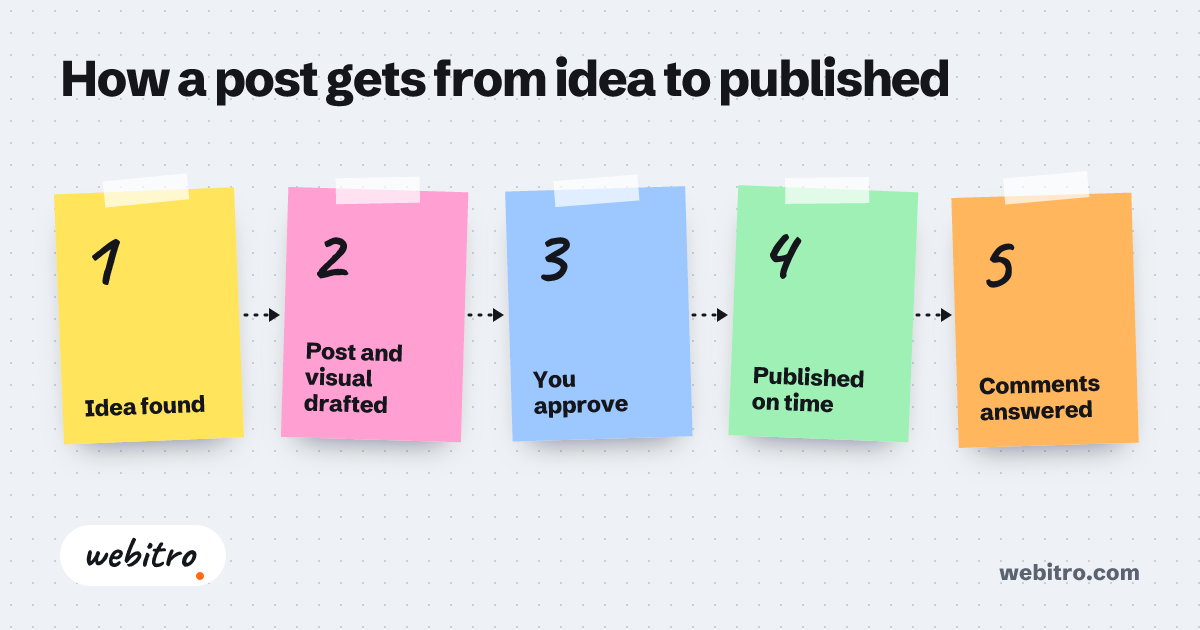
- A custom AI social media manager can read internal records such as order history and CRM entries, which public scheduling tools have no access to.
- The amount of human approval is a design choice rather than a technical limit: you decide which post types need sign-off and which replies can go out alone.
- Brand voice quality depends on the material you supply, so teams with a large back catalogue of posts and support replies get better output than teams starting from nothing.
Video summary of this article
Watch this video on its own page
Video transcript
An artificial intelligence social media manager plans, writes, schedules and replies using your brand material.
It works from your own brand data instead of fixed templates. It combines drafting, reading comments and deciding what to do. The judgement layer knows your tone and when to escalate.
Each day it proposes posts for your approval. It watches comments, mentions and messages through the day. It answers simple questions and routes tricky ones to people.
A subscription suits teams whose content and approval rules match the template. A custom build suits teams whose data and tone do not fit. Custom work can read order history and stock levels.
It learns from material you already have and a written rulebook. It lists words you never use and claims you must not make. A voice model that drifts is worse than no model at all.
Each channel, inbox and analytics source is separate work. Starting with one channel and one approval rule is faster. Expect the first weeks to be supervised before you widen the system.
The article has all the details.
If you want the background on how those decision layers are put together, our explainer on what AI agents are is a fair starting point.
What is an AI social media manager?
An AI social media manager is software that drafts, schedules and answers social posts end to end, working from your own brand data instead of fixed templates.
Think of it as three tools wired together. One drafts and schedules posts. One reads comments, mentions and direct messages. One decides what to do with each of them — reply, escalate or ignore.
Off-the-shelf schedulers stop after the first job. What separates this category is the judgement layer: rules and prompts that know your tone, your banned topics and the point at which a complaint should reach a person.
Because you own the system rather than rent a subscription, it can also draw on things a public tool cannot see. Order history, CRM records, stock levels. That is where the useful personalisation comes from, and it is why Webitro builds social media automation as a custom job rather than a template.
What does an AI social media manager do each day?
Each day it proposes posts for approval, sorts incoming comments and messages by intent, and either answers them or routes them to the right person.
Mornings usually start with a queue. The system pulls trending topics, your own past performers and any campaign brief you have loaded, then proposes a set of posts for the week. You approve, edit or bin them.
Through the day it watches comments, mentions and DMs. A question about delivery gets answered from your help pages. An angry review gets flagged with context attached. A sales enquiry lands in the right inbox with a summary.
At the end of the week you get a report covering what went out, what was answered and where the system hesitated. If you want the background on how those decision layers are put together, our explainer on what AI agents are is a fair starting point.
Buy a tool or commission a custom build?
A subscription suits teams whose content and approval rules already match the template, while a custom build suits those whose data, tone or sign-off chain does not fit.
A tool subscription makes sense if you post the same kind of content across the same few channels and a human checks everything anyway. You get speed, and you get someone else's roadmap.
The trade-off sits at the edges. Approval chains that do not match their model, data locked in a system they never connect to, a voice that keeps getting flattened into marketing speak. That is when teams start looking at building instead.
If you are weighing the two, our comparison of social media automation tools sets out where templates stop being useful.
How does it learn to sound like your brand?
It learns from material you already have — past posts, sales emails and support replies — plus a written list of phrases and claims you will not use.
Voice is not something you can explain in a paragraph and expect to be remembered. It comes from examples. Hand over a few hundred past posts, some sales emails, a handful of support replies, and the system starts to pick up rhythm and vocabulary.
Add a written rulebook on top: words you never use, claims you must not make, jokes that do not land in your sector. Everything generated is checked against that list before it reaches you.
This is the part AI agent development teams spend most time on, because a voice model that drifts is worse than no model at all.
What drives the cost of a custom build?
The cost depends on how many channels and data sources it connects to, how much human approval stays in the loop, and how much of the workflow has no off-the-shelf equivalent.
The main driver is connections. Each channel, inbox, CRM and analytics source is separate work, and an awkward API costs more than a tidy one.
Second is judgement. If a person signs off every post, the build stays simple. If the system decides when a complaint escalates, you are paying for rules, testing and a review process.
Third is how much is genuinely bespoke. A calendar view and a scheduling queue exist in every tool. A workflow that mirrors how your team actually argues about a headline does not.
You can start with a free scoping session, where the channels and data sources are mapped before anything is quoted.
How long before it is live and useful?
A narrow first version on one channel usually goes live well before a full multi-channel system, so launching small and widening later is the faster route.
Nearly every project that works starts narrow. One channel, one content type, one approval rule. You learn how the system behaves before you widen it.
Widening is cheaper than starting wide. Adding a second channel to a working setup is mostly configuration. Discovering later that your approval flow was wrong for everyone is not.
Expect the first weeks to be supervised. Someone reads what the system wrote before it goes out, marks corrections, and those corrections feed back into the rules. If that sounds like the right fit, get in touch and tell us which channel to start with.
How do you know it is actually working?
Judge it on how quickly replies go out, how many conversations close without a person, and whether engagement holds once the novelty wears off.
Reply time is the easy one. If responses that used to sit unanswered now go out the same day, that shows up in customer sentiment quickly.
The harder measure is whether the output holds up. Automation often lifts volume at first and engagement sags a few weeks later, because the posts start to sound alike. Watch for that drift.
Finally, count how much work never reached a person. A system that answers the boring questions and still routes the tricky ones is doing its job properly.
That is where the useful personalisation comes from, and it is why Webitro builds social media automation as a custom job rather than a template.
Frequently Asked Questions
Do I need a large social team to run one of these?
No. The point is to cover the routine work so a small team can handle more channels, not to replace the people you already have.
Can it publish without a human checking first?
It can, if you set it up that way. Most teams keep approval switched on for posts and let replies go out automatically once the rules have proven themselves.
Is this just a scheduling tool with extra marketing?
Not really. A scheduler queues what you write; this writes, decides and answers, and it reads your own systems rather than a fixed template.
Will the posts sound like they were written by a robot?
Only if you let it. Voice comes from your own writing plus a list of banned phrases, so the output usually reads like your team on a busy day.
Where does my data sit?
That depends on how the system is built and where it runs, which is why hosting and data handling should be settled at the start rather than after launch.